Is it worth switching product management tools?
Usually not yet. Switching is worth it when the platform itself blocks work you need to do — not when one workflow annoys you, your process just changed, or one team dislikes the interface. The records migrate fine. What you actually lose is history: the decision trail behind what you shipped.
Almost everything written about switching costs is written by someone with a stake in you switching — migration services, competing platforms, consultants pricing the move. Which is why every guide arrives at the same conclusion. Nobody publishes the version that tells you to stay, and staying is the right answer more often than the genre admits.
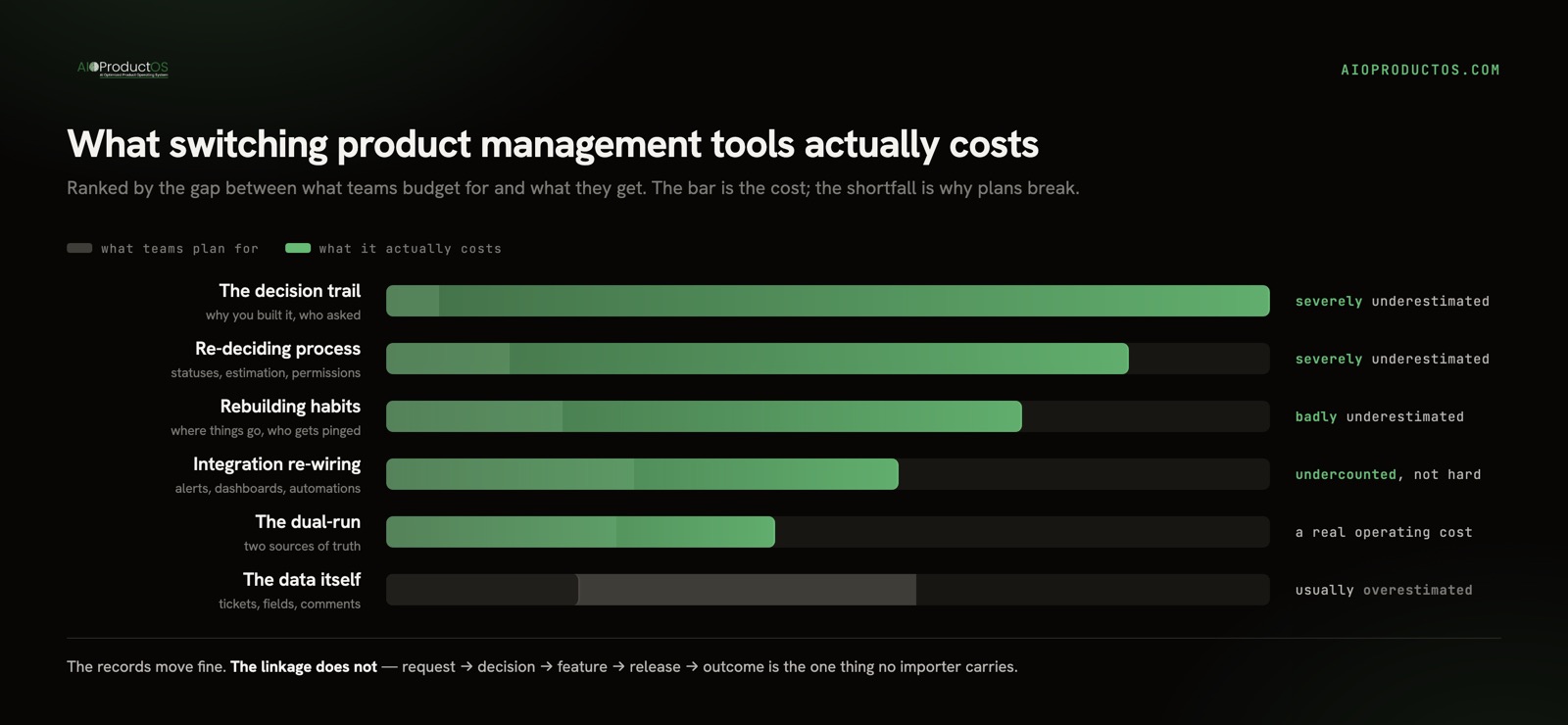
What switching actually costs, ranked by how badly it is underestimated
The categories below are ordered by the gap between what teams expect and what they get, not by size. The first one is the one that ruins plans.
The decision trail. Everything about why the work happened — which customer asked, what you declined and on what grounds, what the release was supposed to move. This is the largest loss and almost nobody budgets for it, because it rarely lived in the tool in the first place. A system where it does live in the tool looks like an unbroken chain from request to decision to release to outcome — worth knowing that shape exists, though on its own it is not a reason to migrate.
Re-deciding your own process. A new tool asks you to define statuses, estimation, board shape, and permissions from scratch. Every one of those is a settled argument you are about to reopen. Teams plan a data migration and get a governance debate.
Behaviour, not features. People do not use a tool, they use a habit. The muscle memory around where things go, who gets notified, and what a column means has to be rebuilt, and it is rebuilt slowly. Context-switching already costs an estimated $450B a year, with the average employee losing 40% of productive time to it (Gallup / TheTab) — and a migration deliberately adds a second place to look, for months.
Integration re-wiring. Every automation, alert, dashboard, and downstream report that references the old tool’s IDs breaks at cutover. This one is underestimated in count, not difficulty: teams remember three integrations and find eleven.
The dual-run period. For as long as both tools are open, you have two sources of truth and full confidence in neither — a genuine operating cost, not a transition detail.
The data itself. Last, and least. Tickets, fields, comments, and attachments move more reliably than anyone expects. If a vendor makes even this hard, that is a different problem — see vendor lock-in in product tools for what to demand before you sign the next one.
The part nobody migrates
Here is the thing that makes PM tools different from a CRM or a help desk. When you move a help desk, tickets are the asset and tickets move. When you move a product stack, the asset is the linkage: request → decision → feature → release → outcome. That chain is what makes a backlog defensible in a room full of stakeholders, and it is the one thing no importer carries.
The uncomfortable diagnosis is that migration usually does not destroy the linkage. It reveals that you never had it. The reasoning lived in a Slack thread, a call nobody recorded, and one person’s memory — the tool only ever held the ticket. Switching resets a clock you did not know was running, and suddenly a year of institutional “why” is unreachable to anyone who was not in the room.
Which means the honest test before any migration is not “can we export?” It is: if the person who ran this backlog left tomorrow, could anyone reconstruct why we built the last ten things? If the answer is no, a new tool does not fix that, and moving will make it visibly worse before it makes it better.
Should you switch? A signal-by-signal read
Run your actual complaint down the left column. Most product teams find their row in the top half.
| What you are seeing | Worth switching? | What to do first |
|---|---|---|
| One workflow is painful; the rest is fine | No | Fix the workflow, or move that one job to a second surface. A platform migration to solve a single screen is a poor trade |
| Your process changed in the last two quarters | No, not yet | Let the process settle. Two changes at once means you cannot tell which one failed |
| You are mid-launch or mid-commitment | No | Schedule after the launch. Nothing about this gets cheaper by starting during crunch |
| Vocal dislike, but nobody can name what they would do differently | No | You are buying a mood. Ask three people to write down the change they expect; if the answers do not agree, stop |
| Cost is growing faster than headcount | Maybe | This is usually a pricing-model problem, not a product problem. Price the alternative honestly first with the SaaS stack cost calculator |
| Three to five tools each hold a piece of the record, and someone reconciles them weekly | Yes, but sequence it | Audit the stack before you move anything — the audit usually changes which tool you replace |
| No tool can answer “why did we build this?” | Yes | This is a linkage problem, and it needs a different shape of system, not a nicer board |
| The vendor cannot give you a complete export | Yes, and start now | Portability decays. The longer you wait, the more history is hostage |
Sequencing: a stack switch is not one migration
Most teams run three to five product tools, so “switching” is rarely a single move. Doing them all in one quarter is the most reliable way to fail: every failure mode compounds and you cannot tell which tool caused which problem. The playbook below is a recommended shape, not a measured schedule.
- Freeze the stack. No new tools enter while a migration is running. Every addition changes the target you are migrating toward.
- Move the system everything else points at first — usually the work tracker. Roadmap, reporting, and analytics all reference its records. Move a downstream tool first and you will move it twice.
- Run parallel, not in place. From the cutover date, all new work is created in the new tool and the old one goes read-only. Two writable systems is how migrations die.
- Dual-run for a sprint or two, not a quarter. Long overlaps do not reduce risk; they normalise working in both.
- Carry history selectively. Migrate open work plus the last couple of quarters of closed work; archive a full export for everything older. Importing five years is where schedules slip.
- Cut integrations over at the cutover, not before. Inventory them properly first — assume there are more than you remember.
- Keep the old licence through one full reporting cycle. Cancel at the quarter close and you will find the missing history at the worst moment.
- Then, and only then, start the second tool. One migration per quarter is a sane ceiling for a team under 50.
One more rule that outranks the rest: name a single owner. A migration without one reverts, quietly, over about six weeks.
When not to switch
This is the section most readers should act on.
The tool is not the problem. Write down the three things that are broken. If two of them would still be broken in a new tool, say unclear ownership or no prioritization discipline or meetings that produce no decisions, you are about to spend a quarter on a rename. New software does not install a process.
Your process just changed. New methodology, new reorg, new team shape? Give it two quarters. Changing the tool while the process is still moving means you will blame the tool for the process, or the reverse, and you will be wrong either way.
You are mid-launch. The value of a stable system of record peaks exactly when things are busiest. There is no version of a cutover that is cheap during a launch window.
The pain is one workflow, not the platform. A single bad screen used weekly is not worth a migration that touches everything used daily. Route around it, script it, or accept it.
The stack is not actually sprawling. The average company runs 101 SaaS apps and wastes around $21M a year on licenses nobody uses (Okta, Zylo) — but a seven-person team with four well-used tools is not that company. Do not migrate against someone else’s statistic.
If you recognised yourself in more than one of those, the correct next action is to close this page and fix a workflow.
If you have decided to move
The reason we built the migration path the way we did is the section above: the linkage is the asset. AIOProductOS joins revenue, feedback, work, and code onto one shared customer record, so a task carries the customer and the revenue behind it rather than pointing at a second system that holds them — which is what makes the “why” survivable next time somebody leaves.
Getting in is a 3-step migration from 12 sources: Trello, Asana, Monday, ClickUp, Shortcut, Productboard, Canny, Notion, Linear, Jira, PostHog, and plain CSV. The connector token is used once and never stored, and the import is free on every plan. Over 100 live connectors keep the tools you decided to keep feeding the same record, so a stack switch does not have to be all-or-nothing. And the way back out is a full-org export on every tier, because a tool you cannot leave is the thing you are trying to escape.
Before you commit, look at the move itself — what comes across, what does not, and how the three steps work. It’s all on the AIOProductOS migration page.